 Anointed Staff
Extra-canon as a public-domain shelf
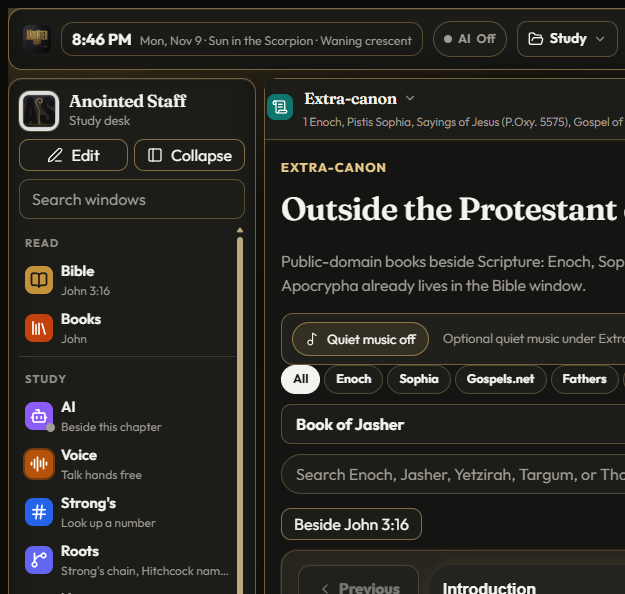
Open Extra-canon while John is still on the rail. The chapter does not vanish. A second pane opens: shelves with names older than your study notebook, each work carrying a credit line at the foot. That is the product promise in one gesture — beside, not instead of.
What the shelf is for
Protestant readers already have an Apocrypha path inside the Bible window when a PD witness includes it. Extra-canon is the wider historical room: Enoch literature, Nag Hammadi study English that clears public-domain gates, Apostolic Fathers extracts, Hermetic tablets as history, world canons labeled as such. The desk refuses to blur those labels into “secret Scripture.”
Anointed Staff treats the sixty-six as the center of the room. Everything else is a labeled shelf. If a title cannot say, in plain English, who translated it and why it may ship, it does not ship.
What ships today
The library grows only through rights-cleared English. Recent shelves include:
- Jubilees and 2 Baruch in Charles’s public-domain English
- Nag Hammadi titles from Zinner / Mattison dedications (including Thunder and Archons)
- Acts of Thomas (James 1924)
- Gutenberg Goetia and the 1830 Book of Mormon
- Scheible’s Sixth & Seventh Books of Moses as OCR’d historical text
- Hermes Emerald Tablet renderings that are PD (not modern copyright wrappers)
- Gospels.net / Charles 1 Enoch / Mead Pistis writings where credits allow
Each work shows a credit footer in the reader. Settings → About repeats the posture for the whole desk: application source under Apache-2.0; texts and media under NOTICE — not “Apache-washed.”
What it refuses
Modern copyright English does not get a free ride because the topic feels ancient. Brill / Coptic Gnostic Library Project editions, sacred-name “restored” Bibles without a clear PD dedication, and ritual-instruction packaging stay out. Hermetic and world shelves are historical study, not a how-to for seals or ceremony.
If a PDF in extra_resources cannot clear a rights gate, ingest scripts refuse it. That is slower than scraping. It is the point of a desk that claims honesty.
Lore without smuggling
The marketing voice calls this an “older shelf” — lamp-lit, labeled, adjacent to the Word. Lore here means atmosphere and care, not a claim that Enoch displaces Genesis. When you open Sophia or Thunder, you are reading history and language beside Scripture, with the chapter still available one pane over.
Readers who want devotion stay in the Bible window. Readers who want context open Extra-canon. The desk keeps both gestures without pretending they are the same shelf.
How to use it on the desk
- Keep a chapter open in the Bible rail.
- Open Extra-canon from the study rail.
- Filter by shelf (Enoch, Sophia, Gospels.net, Fathers, Hermetic, …) or search a title.
- Read the credit before you cite the work in notes.
- Use Ask about this only when a local or configured model is on — and only after you mean to send the packet.
- Optional Quiet music under Extra-canon is offline; it ducks under Hear and Listen.
Quiet music and Hebrew Hear belong to the same local story as this shelf: nothing phones home while you read a PD page. See Offline Practice · quiet desk.
Rights ethics in one paragraph
Public domain is not “old enough, therefore free.” It is a legal and moral status that must be checkable. Anointed Staff prefers named translators (Charles, James, Lightfoot-era Fathers English, Gutenberg dumps with clear headers) over anonymous OCR labeled only as an internal dump. When a scan is noisy — Scheible Moses is the honest example — the desk still shows the credit and the limits rather than polishing the text into a fake critical edition.
Open Bible cross-references remain CC BY and credited in About. They are not Extra-canon; they sit under the Scripture line.
What this is not
- Not a replacement Bible
- Not a ritual grimoire UI
- Not a place to launder modern copyright editions
- Not a cloud library that tracks which “forbidden” title you opened
Heavens has its own fence — clocks, not fortunes — described in Heavens: clocks, not fortunes. Extra-canon’s fence is rights and labeling. Together they keep the mystical tone of the desk from sliding into either fortune-telling or copyright theater.
Download and keep studying
The shelf lives inside the local desk, not on this marketing site. Download for Windows or clone the monorepo. Then open Extra-canon beside a chapter and read the credit line first.